VOR NDB Simulator
For many flight simulation fans, the inner workings of a plane might be totally foreign to you. With so much to learn about and remember, it’s no surprise that many flight simulation fans will find themselves dealing with a little bit of memory loss in the middle of a flight. Read more...
- Media Format
- Immediate Download
- Compatibility
- Windows
- File size
- 14.7 MB
- Developer
- Aviation Tutorials Company
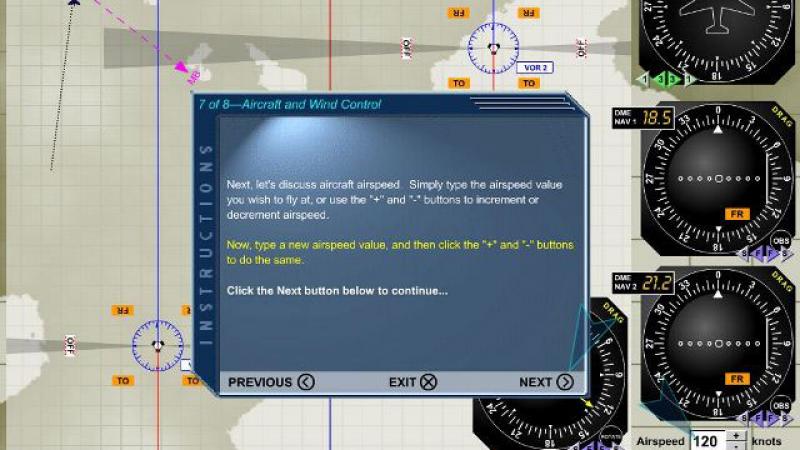
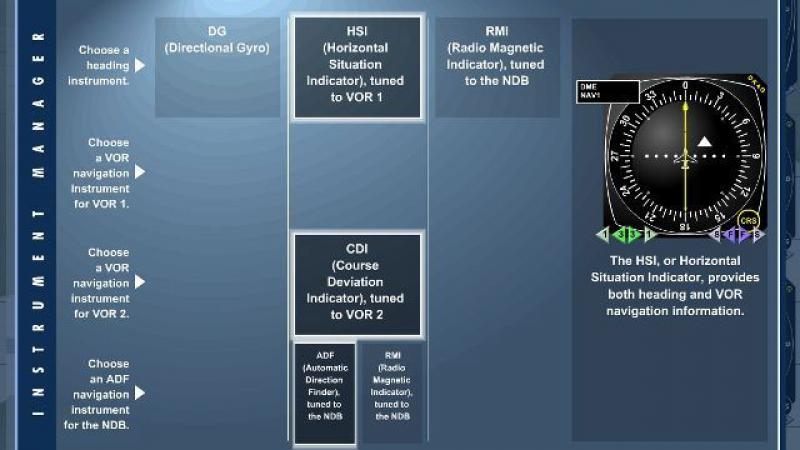
One of the most important aspects of flight simulation, though, is being able to work out how to manage two distinct features – the non-direction radio beacon (NDB) and the VHD omnidirectional range (VOR). This takes a lot of looking around and learning to try and understand how they work, and will typically require you to get involved with some kind of specific training.
This package, then, is just what you have been looking for. A comprehensive training simulator that lets you maximize your knowledge and expertise of these two key factors within flight simulation, you will be able to easily understand and master of these styles. It’s typically a big part of being able to fly effectively, as your navigational aid will act as the main way for you to find your way from one part of the world to the next.
What is VOR NDB?
The different terms that you will hear when using this package will make it quite hard to learn everything at once, especially if you are a relative flight simulation novice. This means spending a chunk of time going back and forth, learning about different features, and being able to understand what the simulator is actually trying to teach you.
To get there, though, you need to be able to understand what VOR and NDB actually do. Having a grip on their purpose and function makes it much easier to actually understand what you are doing in the simulator;
-
VOR is all about being able to offer a short-range radio navigation system that will make sure san aircraft is able to determine where they are and roughly stay on the course they have set by receiving radio signals. These signals are returned by a network that sit on the ground, fixed in position, and deliver these signals via radio beacons. They use what is known as VHF – very high frequency – band to ensure that the aircraft can know where they are. As the most commonly used and “standard” form of navigation in the world, it’s no surprise that VOR is so well thought of
-
NDB, on the other hand, is a radio transmitter that sits at a specific location and is used as some form of navigational aid for anything from aircraft to submarines and boats. It does not include directional information, though, like VOR does. What it does provide, though, is a pathway that follows the curvature of the Earth itself and can also be received much further away and at much lower altitudes. However, both are equally affected by things like the terrain, the atmospheric conditions and even things like coastal refraction, making understanding them a challenge
Key Benefits
-
This package that you will be downloading perfectly simulates navigation using VOR and NDB. This makes it so much easier to actually put in place, and will give you one of the most effective ways of training and preparing for this. However, it also takes away a lot of the real-life stuff that you would need to traditionally take on if you were to use something like this. You will remove the need to deal with things like airspace, traffic, communications on the radio and even altitude control as you would be expecting to manage at any stage in flight
-
Given the difficulty of learning in a real aircraft – or even a simulator – you will need to take on a huge range of tasks that you simply cannot manage. This makes them poor learning tools and will ensure that you suffer in some capacity when trying to learn. However, with this simulator, you will get to try this entire out with the distractions and challenges that typically throw themselves at you when you are trying to learn navigational procedure. This is arguably one of the most useful things that you can deal with as you get to understand aviation
-
Rather than sitting reading hours’ worth of theory or feeling like you are stuck in some serious lecture, this practical approach to managing key aspects of flight makes it nice and fun for everybody. This will, in turn, make you a better pilot as you will have legitimate experience at using these features instead of just reading about them or seeing them managed by an expert on the screen. You’ll get access to such interesting visualizations in high detail, too, that it becomes incredibly easy to manage this and make it work in the idea and the style that you wanted
-
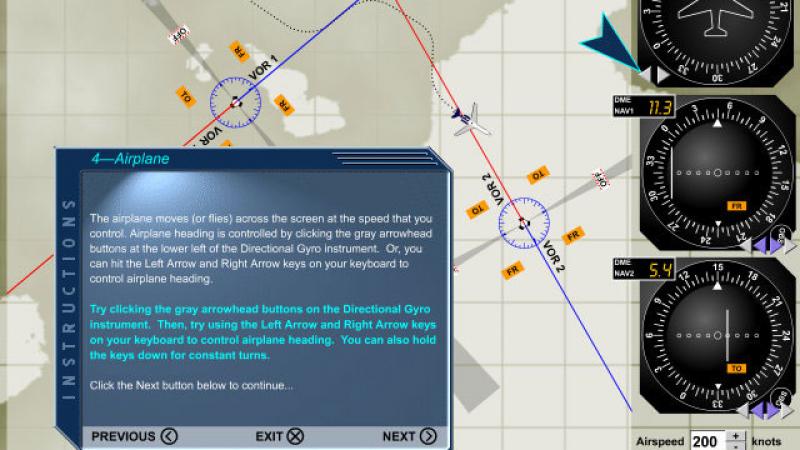
A series of unique components are offered in here that will ensure you can learn how to manage an aircraft properly in terms of navigation. You’ll learn how to deal with things like a plane flying across the screen, VORs and NDBs specifically, as well as other various flight instruments that you need to master to get to the very top of the profession. You’ll also have access to the key controls that deal with things like flight speed, direction and even the wind components. Getting to grips with all of this is going to be absolutely vital to you
-
Develop the required skills to fly your aircraft at a pace that you feel comfortable with, and are sure that you can take on without any problems or struggles. This will give you a much better chance of completing the course and understanding these advanced parts of mastering a flight
Key Features
-
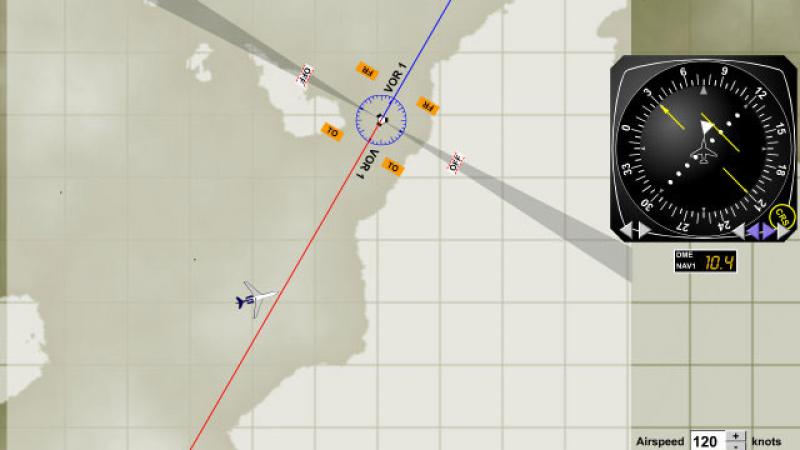
Within his package, you will get access to the ability to set the navigations instruments up as you are asked, and then make sure the aircraft is in the right direction to intercept and then track any and all VOR and NDB readings. You’ll get to practice key things such as position finding, interception and tracking skills. This will help you become a much better pilot in general, and will also help you take on more advanced ranges and features such as DME arcs as well as holding in general
-
By creating a wide range of custom navigation scenarios by dragging the VORs, NDBs and other systems around the place you can start to really understand what is going on in front of you. A simple point and click interface makes it easy to get to grips with both the theory and the practice of these hugely important flight instruments
-
With one simulator module to pick from alone, you can make up as many changes and adjustments as you possibly need from the excellent Manager
-
On-screen instructions are all provided clear as day, but if you miss anything or don’ quite understand what it meant you will have voice narration
-
Select the best flight and navigation instruments from a huge selection of combinations such as Direction Gyro, Automatic Direction Finer and Radio Magnetic Indicator, and more!
-
With draggable instruments you can arrange everything as you wish – or to the authentic layout – to fit the aircrafts instrument panel just about perfectly
-
Random buttons also generate a random heading entirely, allowing you to take on something that you haven’t prepared and managed for – this adds another layer of difficulty to the whole thing and makes it really easy to get the kind of service that you need for an extra, refined challenge
-
By using the keyword and/or the mouse you can change the turn rate of the aircraft by around 3 degrees per second. This will help you get the right balance in your flight, and ensure that you are capable of managing the turning aspect for going in the right direction
-
ADF interference will come into play during the simulation, meaning that you need to get used to a mild variance in the indicators that you are getting – this makes navigation more challenging, for as start, but it also makes it much more realistic as indicators can be out quite significantly
-
Another nice feature that was added in was the brilliant instruments and map area that can be printed out. This lets you study the indicators and the layout that you have away from the real-time environment, so that you can master the various things that are showing up on screen
-
A popular addition was the added grid lines on the map area; these represent a square mile and make the scale feel far more authentic
-
ADF instruments allow for a fixed-card and rotatable-card; it’s all about your own preference and what you like to see take place in front of you!
-
Precise movement and features make sure that the course needle on your Course Deviation indicators and Horizontal Situation Indicator allows you to find a greater level of accuracy throughout
-
A compass rose symbol on the VOR will remain stationary when you make a change to the course in mid-flight

About Aviation Tutorials Company
Aviation Tutorials Company LLC based in Wisconsin, USA have been developing and designing flight tutorials and aviation training software since 1995.
While we list their products on this flight simulator related store, their products are marketed to real-world trainee pilots and aviation enthusiasts alike. They can however still be beneficial for virtual aviators who follow simulation to the letter.
Their products cover a large range of flight training and aviation topics including radar, navigation and weather conditions. Their staff include several real-world airline pilots along with designers in computer software and graphic design.
Related Products
Submit a review of this product
Do you own a copy of this add-on? Have you used it? We'd love to hear your feedback on it below. You don't even need to have purchased it from SimShack.